39点博客
39点博客一、CentOS6停止维护更新日期2020年11月30日
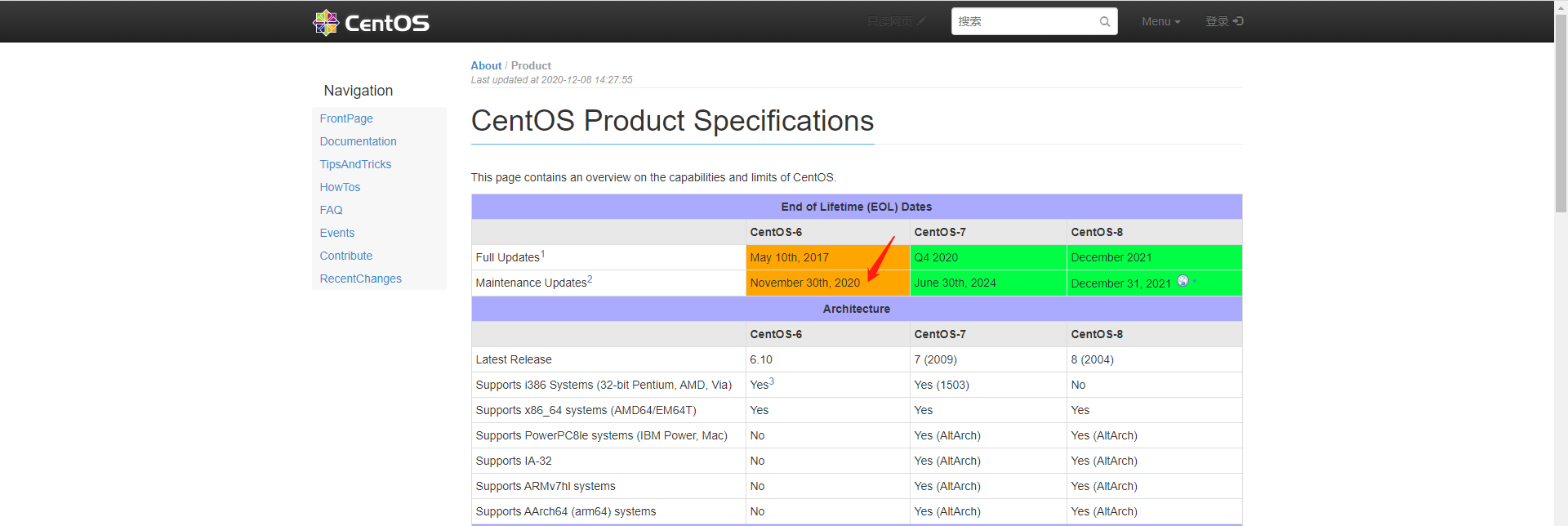
二、2020年12月2日下架了包括官方所有的CentOS6源(包括国内的镜像站)

三、CentOS6也完成了它的历史使命
在生产的环境中依旧由很多CentOS6系统依然在坚持,那么可以采取挂载光盘或者使用centos-vault源安装软件包,这里挂载光盘的方式不做讲述。1
四、使用centos-vault作为更新源
1.官方地址
#阿里云http://mirrors.aliyun.com/centos-vault/#官方https://vault.centos.org/#阿里云和官方的任选其一即可1234567
2.使用阿里云centos-vault源
vi /etc/yum.repos.d/CentOS-Base.repo# CentOS-Base.repo## The mirror system uses the connecting IP address of the client and the# update status of each mirror to pick mirrors that are updated to and# geographically close to the client.  You should use this for CentOS updates# unless you are manually picking other mirrors.## If the mirrorlist= does not work for you, as a fall back you can try the# remarked out baseurl= line instead.##[base]name=CentOS-6.10 - Base - mirrors.aliyun.com
failovermethod=priority
baseurl=http://mirrors.aliyun.com/centos-vault/6.10/os/$basearch/
gpgcheck=1
gpgkey=http://mirrors.aliyun.com/centos-vault/RPM-GPG-KEY-CentOS-6#released updates[updates]name=CentOS-6.10 - Updates - mirrors.aliyun.com
failovermethod=priority
baseurl=http://mirrors.aliyun.com/centos-vault/6.10/updates/$basearch/
gpgcheck=1
gpgkey=http://mirrors.aliyun.com/centos-vault/RPM-GPG-KEY-CentOS-6#additional packages that may be useful[extras]name=CentOS-6.10 - Extras - mirrors.aliyun.com
failovermethod=priority
baseurl=http://mirrors.aliyun.com/centos-vault/6.10/extras/$basearch/
gpgcheck=1
gpgkey=http://mirrors.aliyun.com/centos-vault/RPM-GPG-KEY-CentOS-6#additional packages that extend functionality of existing packages[centosplus]name=CentOS-6.10 - Plus - mirrors.aliyun.com
failovermethod=priority
baseurl=http://mirrors.aliyun.com/centos-vault/6.10/centosplus/$basearch/
gpgcheck=1
enabled=0
gpgkey=http://mirrors.aliyun.com/centos-vault/RPM-GPG-KEY-CentOS-6#contrib - packages by Centos Users[contrib]name=CentOS-6.10 - Contrib - mirrors.aliyun.com
failovermethod=priority
baseurl=http://mirrors.aliyun.com/centos-vault/6.10/contrib/$basearch/
gpgcheck=1
enabled=0
gpgkey=http://mirrors.aliyun.com/centos-vault/RPM-GPG-KEY-CentOS-61234567891011121314151617181920212223242526272829303132333435363738394041424344454647484950515253
3.使用官方centos-vault源
vi /etc/yum.repos.d/CentOS-Base.repo# CentOS-Base.repo## The mirror system uses the connecting IP address of the client and the# update status of each mirror to pick mirrors that are updated to and# geographically close to the client.  You should use this for CentOS updates# unless you are manually picking other mirrors.## If the mirrorlist= does not work for you, as a fall back you can try the# remarked out baseurl= line instead.##[base]name=CentOS-6.10 - Base - vault.centos.org
failovermethod=priority
baseurl=http://vault.centos.org/6.10/os/$basearch/
gpgcheck=1
gpgkey=http://vault.centos.org/RPM-GPG-KEY-CentOS-6#released updates[updates]name=CentOS-6.10 - Updates - vault.centos.org
failovermethod=priority
baseurl=http://vault.centos.org/6.10/updates/$basearch/
gpgcheck=1
gpgkey=http://vault.centos.org/RPM-GPG-KEY-CentOS-6#additional packages that may be useful[extras]name=CentOS-6.10 - Extras - vault.centos.org
failovermethod=priority
baseurl=http://vault.centos.org/6.10/extras/$basearch/
gpgcheck=1
gpgkey=http://vault.centos.org/RPM-GPG-KEY-CentOS-6#additional packages that extend functionality of existing packages[centosplus]name=CentOS-6.10 - Plus - vault.centos.org
failovermethod=priority
baseurl=http://vault.centos.org/6.10/centosplus/$basearch/
gpgcheck=1
enabled=0
gpgkey=http://vault.centos.org/RPM-GPG-KEY-CentOS-6#contrib - packages by Centos Users[contrib]name=CentOS-6.10 - Contrib - vault.centos.org
failovermethod=priority
baseurl=http://vault.centos.org/6.10/contrib/$basearch/
gpgcheck=1
enabled=0
gpgkey=http://vault.centos.org/RPM-GPG-KEY-CentOS-61234567891011121314151617181920212223242526272829303132333435363738394041424344454647484950515253
4.替换CentOS-Base.repo文件内容后清除下缓存
yum clean all && yum makecache1
五、那么如何使用epel源
1.官方地址
https://archives.fedoraproject.org/pub/archive/epel/1
2.下载安装epel源
#下载epel源wget https://archives.fedoraproject.org/pub/archive/epel/6/x86_64/epel-release-6-8.noarch.rpm#安装epel源rpm -ivh epel-release-6-8.noarch.rpm#清除下缓存yum clean all && yum makecache
原创类文章未经允许请勿转载:39点博客 » Centos6系统yum无法使用-最新解决办法